
EconomSys › Help › Main menu › Inventory – stock items › Warehouse card editor
A warehouse card holds all details of a product or service. Open it from stock items with New or Edit.
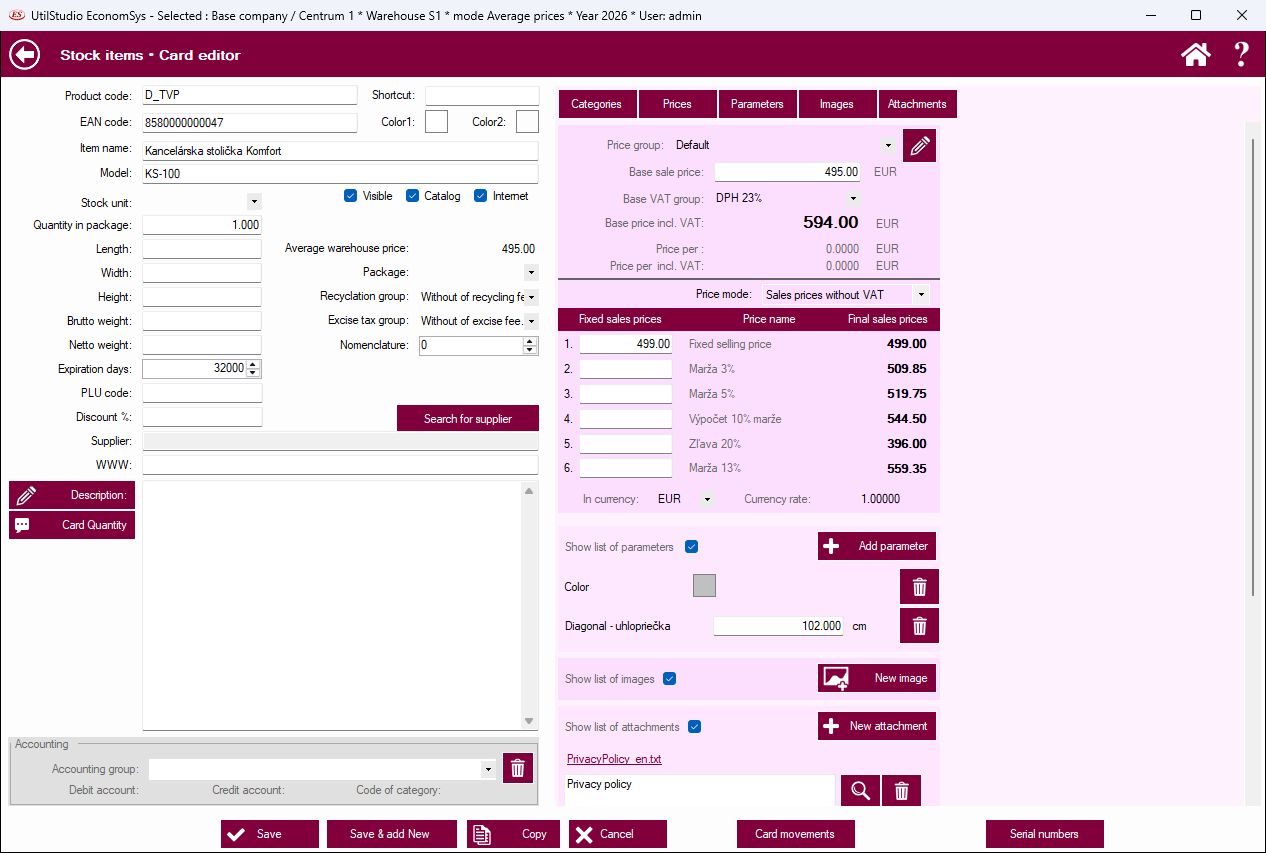
Product code, shortcut, EAN code, item name, model, stock unit, quantity in package, dimensions and weight, shelf life in days, PLU code, discount %, supplier (with a supplier search) and web address. Write a detailed description into the Description field. The Visible, Catalog and Internet check boxes decide where the card is shown. Further: package, recycling group, excise tax group and nomenclature. The average stock price is shown as well.
Choose the price group, enter the basic sales price and the basic VAT group; the program calculates the price including VAT. The price mode decides whether you enter prices without or with VAT. The fixed sales prices table holds up to 6 prices (e.g. margins or discounts) with the final price calculated. Prices can also be in another currency with an exchange rate.
The Categories, Prices, Parameters, Pictures and Attachments tabs jump to the matching part. Add technical parameters, photos and files with the add buttons. In Accounting choose an accounting group. At the bottom: Save, Save & add new, Copy, Cancel, Card movements and Serial numbers.
← Back to help contents · Need help? Contact us.
Copyright © 2020 UtilStudio, s.r.o. - UtilStudio.com