
EconomSys › Help › Main menu › Invoices and documents – list › Creating an invoice
In this window you create or edit an invoice – and in the same way an order, proforma invoice, delivery note or price offer. The customer and dates are at the top, details and the delivery address on the right and the document items at the bottom.
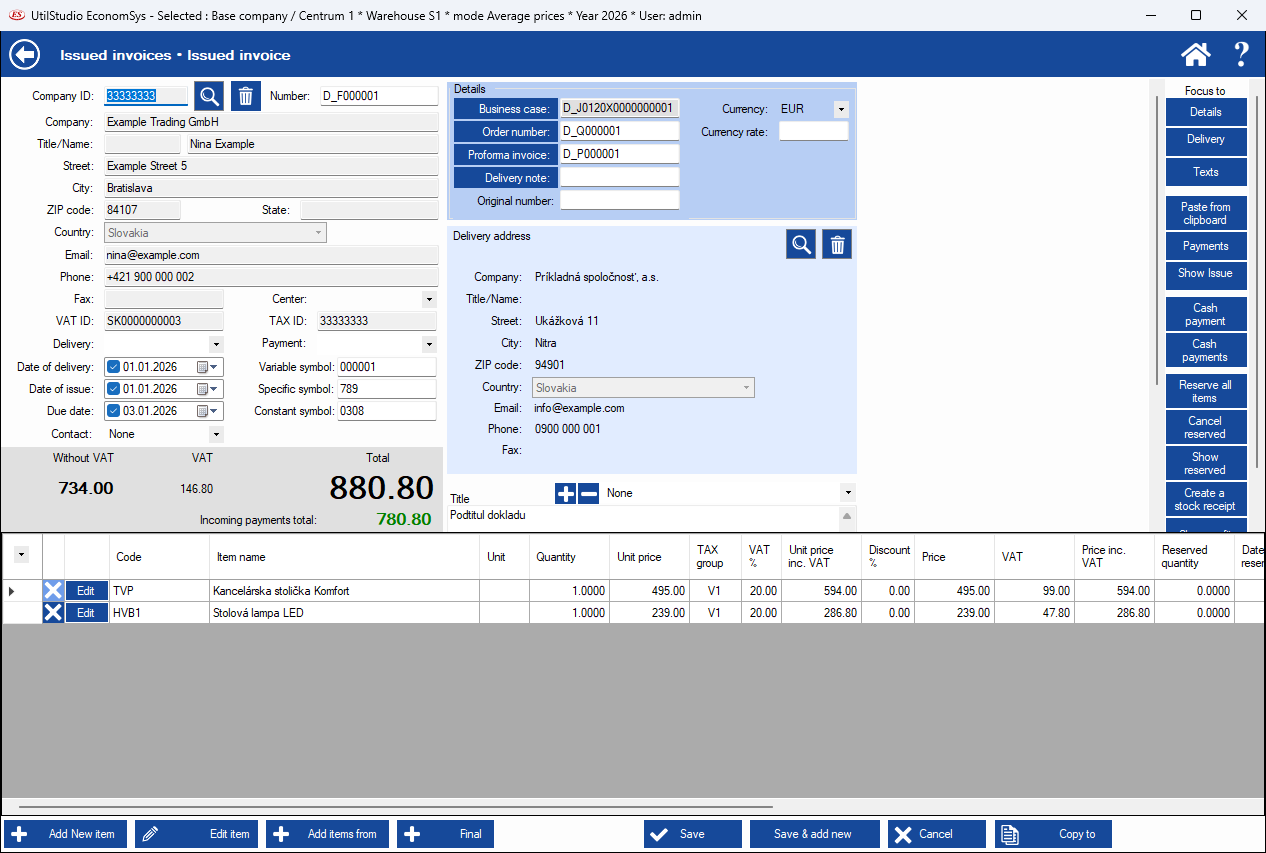
Type the Company ID and click the magnifier – the program finds the address in the address list. The bin clears the customer. The details (Company, Name, Street, City, ZIP code, Country, Email, Phone, VAT ID, TAX ID) are stored in the document.
Fill in the Date of delivery, Date of issue and Due date, the Delivery and Payment method, the Variable, Specific and Constant symbol and optionally the Contact and Center. Totals Without VAT, VAT, Total and Incoming payments total are calculated automatically.
The Details part links the document to a Business case, Order number, Proforma invoice and Delivery note and holds the Original number, Currency and Currency rate. Choose the Delivery address with the magnifier. Below it select the Title and document texts.
Details, Delivery, Texts – quick jump; Paste from clipboard; Payments and Cash payment; Reserve all items, Cancel reserved, Show reserved – stock reservations; Create a stock receipt.
← Back to help contents · Need help? Contact us.
Copyright © 2020 UtilStudio, s.r.o. - UtilStudio.com